
Call Centre Workforce Planning Using Erlang C in R language

Peter Prevos |
2188 words | 11 minutes
Share this content
We all hate the experience of calling a service provider and being placed on hold for a very long time. Organisations that take their service levels seriously plan their call centres. Good planning ensures that customer waiting times remain within acceptable limits. Having said this, making people wait for something can, in some instances, increase perceived value. This article shows how to implement call centre workforce planning with the R language.
Contact centre workforce planning involves an exciting mix of rational production management and the soft skills of providing service with a smile. The mathematics of managing a call centre ensures customers have a great experience by limiting waiting times.
The Grade of Service can numerically express call centre performance. This KPI is the percentage of calls answered within a specific time. For example, 90% of calls are responded to within 30 seconds.
This Grade of Service depends on the following:
- The volume of calls made to the centre.
- The number of available agents
- The time it takes to service a customer.
Working in a call centre can be chaotic, so we need some maths to understand it. The Erlang C formula describes the relationship between the Grade of Service and various variables to bring some order to the chaos.
Call centre workforce planning is a complex activity that is a perfect problem to solve in R code. This article explains how to use the Erlang C formula in R to manage a contact centre. The presented code calculates the number of agents needed to meet a required Grade of Service. This approach is extended to a Monte Carlo setting to better understand the real world's stochastic nature.
The Erlang C Formula
The Erlang C formula describes the probability that a customer must queue rather than be immediately serviced $(P_w)$. This formula is closely related to the Poisson distribution, which describes queues such as traffic lights or hospital waiting lists.
$$P_w = \frac{\frac{A^N}{N!}\frac{N}{N-A}}{\Big( \sum_{i=0}^{N-1} \frac{A^i}{i!} \Big)+\frac{A^N}{N!}\frac{N}{N-A}}$$
The intensity of traffic $A$ is the number of calls per hour multiplied by the average duration of a call. Traffic intensity is measured in dimensionless Erlang units, which expresses the time it would take to manage all calls if they arrived sequentially. Intensity measures the effort required in an hour. In reality, calls arrive at random times during the hour, which is where the Poisson distribution comes in. The waiting time is also influenced by the number of available operators $N$.
Both common sense and the formula show that increasing the number of calls or decreasing the number of operators increases the likelihood that customers are placed in a queue. The more staff, the higher the service level, but how many people do you need to achieve your desired grade of service efficiently?
The Grade of Service $S$ is a function of the outcome of the Erlang C formula ($P_w$), the number of agents ($N$), the call intensity ($A$), call duration ($\lambda$) and lastly the target answering time ($t$).
The Erlang C formula can be reworked to provide that answer. I sourced this solution from callcenterhelper.com. We now have a toolset for call centre planning that we can implement in R.
$$S = 1 - \Large[ P_w e^ {-[(N-A](t/ \lambda)]} \large]$$
Erlang C in R
The Erlang C formula contains factorials and powers, which become problematic at high call volumes or with many agents. The Multiple Precision Arithmetic library enables working with large integer factorials, but there is no need to wield such strong computing powers. To make life easier, the Erlang C formula includes the Erlang B formula, the inverse of which can be calculated using a small loop.
This implementation is very similar to an unpublished R package by Patrick Hubers, enhanced with work from callcenterhelper.com. This code contains four functions:
intensity: Determines intensity in Erlangs based on the rate of calls per interval, the total call handling time and the interval time in minutes. All functions default to a 60-minute interval. Erlangs are a dimensionless unit of measure of the offered load.erlang_c: Processes the Erlang C formula using the number of agents and the variables determining intensity (call rate and call handling time). The output is the probability that a customer has to wait for service.service_level: Calculates the service level. The inputs are the same as above, plus the period for the Grade of Service in seconds.resource: Seeks the number of agents needed to meet a Grade of Service. This function starts with the minimum number of agents (the intensity plus one agent) and keeps searching until it finds the number of agents that achieve the desired Grade of Service.
Erlang C Code
  ## Call Centre Workforce Planning Using Erlang C in R language

  ## Erlang-C Functions
  intensity <- function(rate, duration, interval = 60) {
      (rate / interval) * duration
  }

  erlang_c <- function(agents, rate, duration, interval = 60) {
      int <- intensity(rate, duration, interval)
      erlang_b_inv <- 1
      for (i in 1:agents) {
          erlang_b_inv <- 1 + erlang_b_inv * i / int
      }
      erlang_b <- 1 / erlang_b_inv
      agents * erlang_b / (agents - int * (1 - erlang_b))
  }

  service_level <- function(agents, rate, duration, target, interval = 60) {
      pw <- erlang_c(agents, rate, duration, interval)
      int <- intensity(rate, duration, interval)
      1 - (pw * exp(-(agents - int) * (target / duration)))
  }

  resource <- function(rate, duration, target, gos_target, interval = 60) {
      agents <- round(intensity(rate, duration, interval) + 1)
      gos <- service_level(agents, rate, duration, target, interval)
      while (gos < gos_target * (gos_target > 1) / 100) {
          agents <- agents + 1
          gos <- service_level(agents, rate, duration, target, interval)
      }
      return(c(agents, gos))
  }
Call centre workforce planning using R
For example, you manage a call centre with 100 calls every 30 minutes and an average handling time of 3 minutes. These numbers result in an intensity of intensity(100, 3, 30) 10 Erlangs, or 10 call hours of traffic per hour. This result means we need at least 10 agents, assuming all calls arrive in sequence.
The reality of a contact centre is chaotic: calls arrive randomly, so there is a high probability that an operator will be busy if we use only 10 agents. You can enter this data into the Erlang C in R function to find the probability that a customer will need to wait. With ten agents, the likelihood is 100%. With 11 agents, it is 68%. The = sapply function helps to view the impact of adding more customer service agents.
  erlang_c(11, 100, 3, 30)
  [1] 0.6821182

  sapply(10:20, erlang_c, rate = 100, duration = 3, interval = 30)
  [1] 1.000000000 0.682118205 0.449388224 0.285270453 0.174131934 0.102042367
  [7] 0.057340331 0.030876110 0.015928277 0.007873558 0.003731126
The likelihood of a customer having to wait is the main target for any service that involves queueing. We need to set a target service level or Grade of Service. The service_level function calculates the Grade of Service using the previous parameters plus the target in seconds. Let's make some assumptions:
- Required Grade of Service 80%
- Target answer time: 20 seconds
Using the function, we can quickly see that with 11 agents and 100 calls per 30 minutes, the Grade of Service is only 39%, well below the required 80%. Using sapply(), we can see that we need just over 13 available agents.

The resource() function ties everything together and seeks the number of agents needed to meet the required grade of service. We need at least 14 available agents to answer 80% of calls within 20 seconds, which gives us an actual predicted Grade of Service of 88%.
  ## Example
  service_level(agents = 11, rate = 100, duration = 3, target = 20 / 60, interval = 30)

  service <- data.frame(agents = 10:20,
                        GoS = sapply(10:20, service_level, rate = 100, duration = 3, target = 20 / 60, interval = 30))

  library(ggplot2)
  ggplot(service, aes(agents, GoS)) +
    geom_line() +
    scale_x_continuous(breaks = 10:20) +
    scale_y_continuous(labels = scales::percent) +
    geom_hline(yintercept = 0.8, col = "blue") +
    theme_bw(base_size = 10) +
    labs(title = "Call Centre Simulation",
         subtitle = "Erlang-C Formula")
  ggsave("call-centre-example.png", width = 6, height = 4)

  resource(rate = 100, duration = 3, target = 20/60, gos_target = 80, interval= 30)
Call Centre Workforce Planning with Erlang C Monte Carlo Simulation
I used the Erlang C model to recommend staffing levels in a contact centre some years ago. This experience taught me that the mathematical model is the first step towards call centre workforce planning. Several other metrics can be built on the Erlang C model, such as agents' average occupancy and handling time.
Like all mathematical models, the Erlang C formula is an idealised version of reality. Agents are not always available; they need breaks, toilet stops and might even go on leave. Employers call this loss of labour' shrinkage,' a somewhat negative term for something positive for the employee. The Erlang C model provides the number of 'bums on seats'.
Like every model, the Erlang C formula is not a perfect representation of reality. The formula tends to overestimate the required resources because it assumes that people will stay on hold indefinitely, while the queue will automatically shorten as people lose patience.
The number of employees required to provide this capacity depends on the call centre's working conditions. For example, if employees are only available to take calls 70% of their contracted time, you will need $1/0.7=1.4$ staff members for each live agent to meet the Grade of Service.
Another problem is the stochastic nature of call volumes and handling times. The Erlang C model assumes that a manager can estimate call volume and handling time (intensity) as static variables, whereas in reality they are stochastic and subject to variation. Time series analysis can help predict call volumes, but every prediction carries some uncertainty. We can manage this uncertainty by using a Monte Carlo simulation.
All the functions listed above can be rewritten to return a vector of possible answers based on the average call volume and duration, along with their standard deviations. This simulation assumes normal distributions for both call volume and call length. The outcome of this simulation is a distribution of service levels.
Monte Carlo Simulation
A Monte Carlo simulation is a method to simulate reality by defining a probability distribution of the events in the model.
For example, a call centre receives, on average, 100 calls per half hour, with a standard deviation of 10. The average time to manage a call, including wrap-up time, is 180 seconds, with a standard deviation of 20 seconds. The centre needs to answer 80% of calls within 20 seconds. What is the likelihood of achieving this level of service?
The average intensity of this scenario is 10 Erlangs. Using the resource formula suggests that we need 14 agents to meet the Grade of Service. Simulating the scenario 1000 times indicates that the intensity lies between 5.4 and 15.9 Erlangs (see the code at the end of this article).
  resource(100, 180, 20, 80, 30)
  [1] 14.0000000 0.88835

  intensity_mc(100, 10, 180, 20) %>% summary()

  Min. 1st Qu. Median Mean 3rd Qu. Max.
  5.480 8.975 9.939 10.025 10.993 15.932
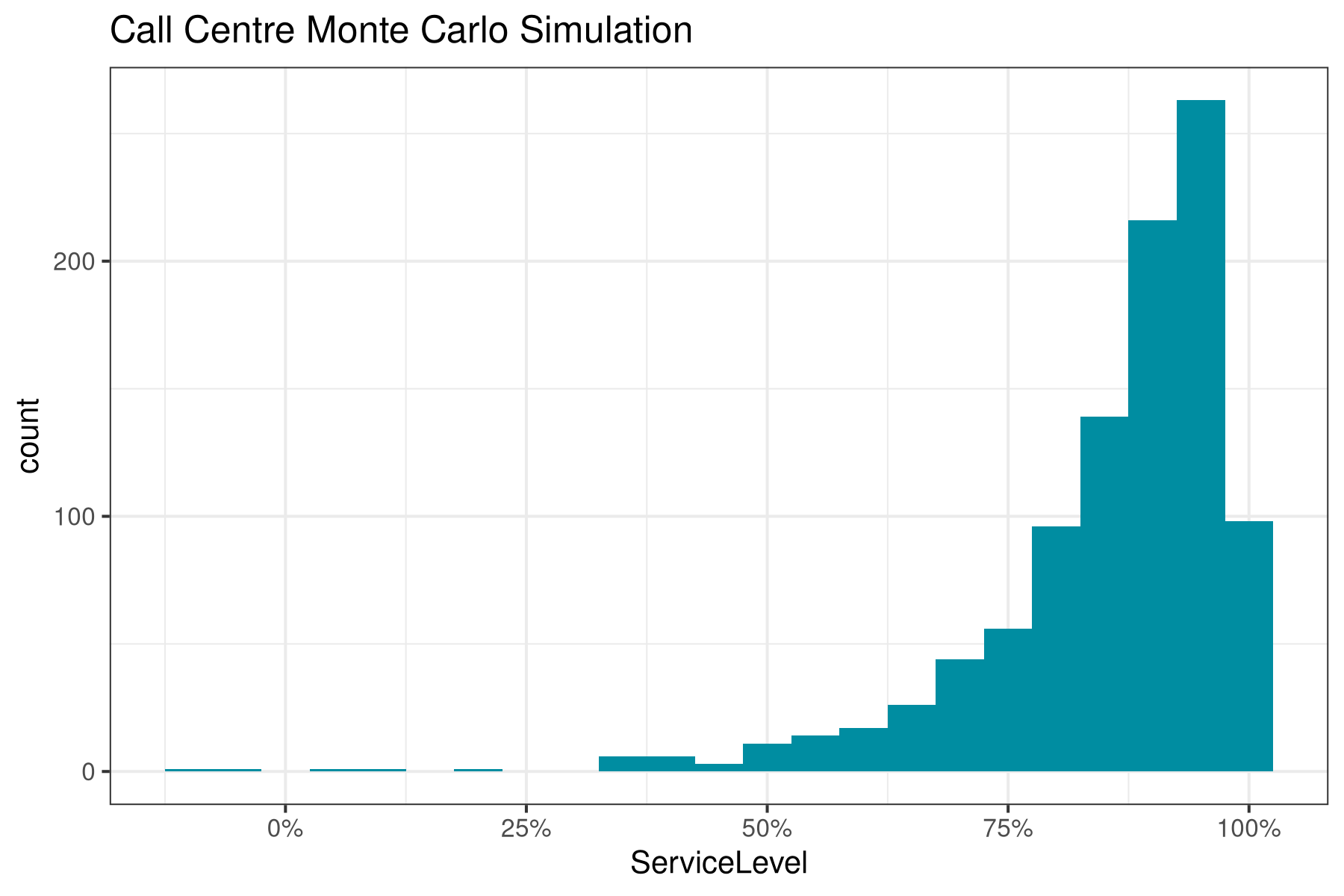
The next step is to simulate the expected service level for this scenario. The plot visualises the outcome of the Monte Carlo simulation and shows that in 95% of situations, the Grade of Service is more than 77% and half the time, it is more than 94%.
  service_level_mc(15, 100, 10, 180, 20, 20, 30, sims = 1000) %>%
  + quantile(c(.05, .5, .95))
  5% 50% 95%
  0.7261052 0.9427592 0.9914338
This article shows that Erlang C in R helps managers plan the call centre workforce. We may need a Shiny application to develop a tool to manage the complexity of these functions. I would love to hear from people with practical experience in managing call centres about how they analyse data.
Monte Carlo Simulation Code
  ## Monte Carlo Simulation

  library(tidyverse)

  intensity_mc <- function(rate_m, rate_sd, duration_m, duration_sd, interval = 60, sims = 1000) {
    (rnorm(sims, rate_m, rate_sd) / (60 * interval)) * rnorm(sims, duration_m, duration_sd)
  }

  intensity_mc(100, 10, 180, 20, interval = 30) %>%
    summary()

  erlang_c_mc <- function(agents, rate_m, rate_sd, duration_m, duration_sd, interval = 60) {
    int <- intensity_mc(rate_m, rate_sd, duration_m, duration_sd, interval)
    erlang_b_inv <- 1
    for (i in 1:agents) {
      erlang_b_inv <- 1 + erlang_b_inv * i / int
    }
    erlang_b <- 1 / erlang_b_inv
    agents * erlang_b / (agents - int * (1 - erlang_b))
  }

  service_level_mc <- function(agents, rate_m, rate_sd, duration_m, duration_sd, target, interval = 60, sims = 1000) {
    pw <- erlang_c_mc(agents, rate_m, rate_sd, duration_m, duration_sd, interval)
    int <- intensity_mc(rate_m, rate_sd, duration_m, duration_sd, interval, sims)
    1 - (pw * exp(-(agents - int) * (target / rnorm(sims, duration_m, duration_sd))))
  }

  tibble(ServiceLevel = service_level_mc(agents = 14,
                                         rate_m = 100,
                                         rate_sd = 10,
                                         duration_m = 180,
                                         duration_sd = 20,
                                         target = 20,
                                         interval = 30,
                                         sims = 1000)) %>%
    ggplot(aes(ServiceLevel)) +
    geom_histogram(binwidth = 0.05, fill = "#008da1") +
    scale_x_continuous(labels = scales::percent) +
    theme_bw(base_size = 10) +
labs(title = "Call Centre Monte Carlo Simulation")Share this content